Open source · AGPL-3.0

Your own AI assistant,
on a server you run

Kelo is an AI assistant that runs on a Kelo server you set up. Message it from your phone and it gets the job done in its own browser and the services you've connected. Anything hard to undo, like paying or sending, waits for your OK.

2 GB
RAM to start
Any number
of phones

One request, start to finish

Say what you need. It sees it through.

Kelo searches, checks with you, finishes the job and looks back on the day. You can follow every step on your phone.

  1. Ask in words or by voice

    Type or talk. Send photos and PDF, Word or Excel files along with it. Kelo answers in the language you wrote in.

    Kelo chat: KTX times and fares for a Busan business trip next Tuesday, laid out in a reply.
  2. It searches in its own browser

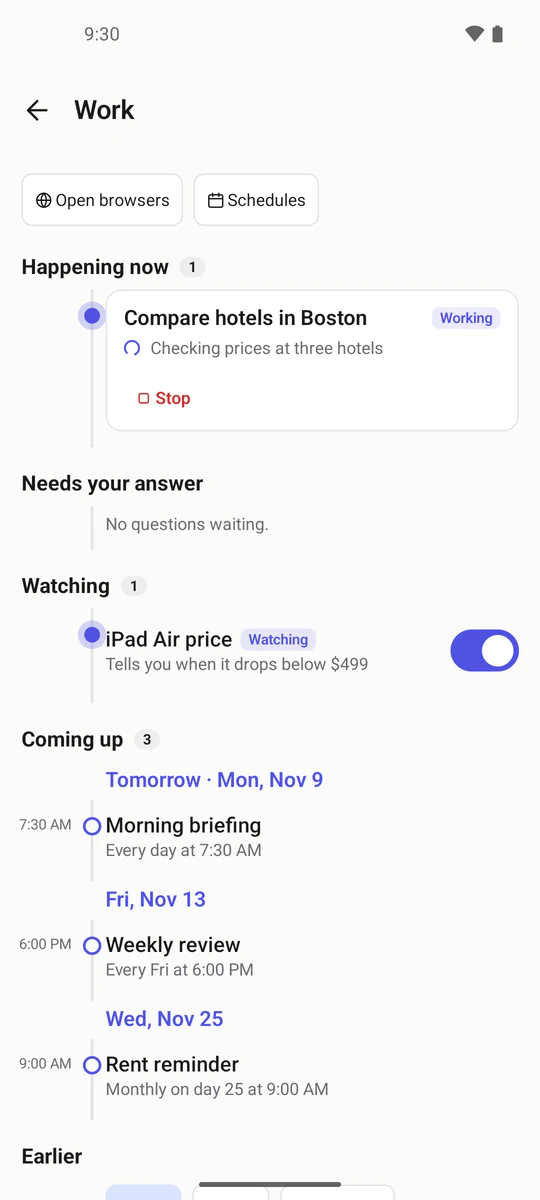
    Kelo opens sites, compares and fills in forms in its own Chromium, inside the Kelo server. Watch it live from your phone, take over, and hand it back. That browser is walled off from your home network.

    Work screen: the running task “Compare stays in Busan”, a price being watched, and upcoming schedules.
  3. It asks before anything final

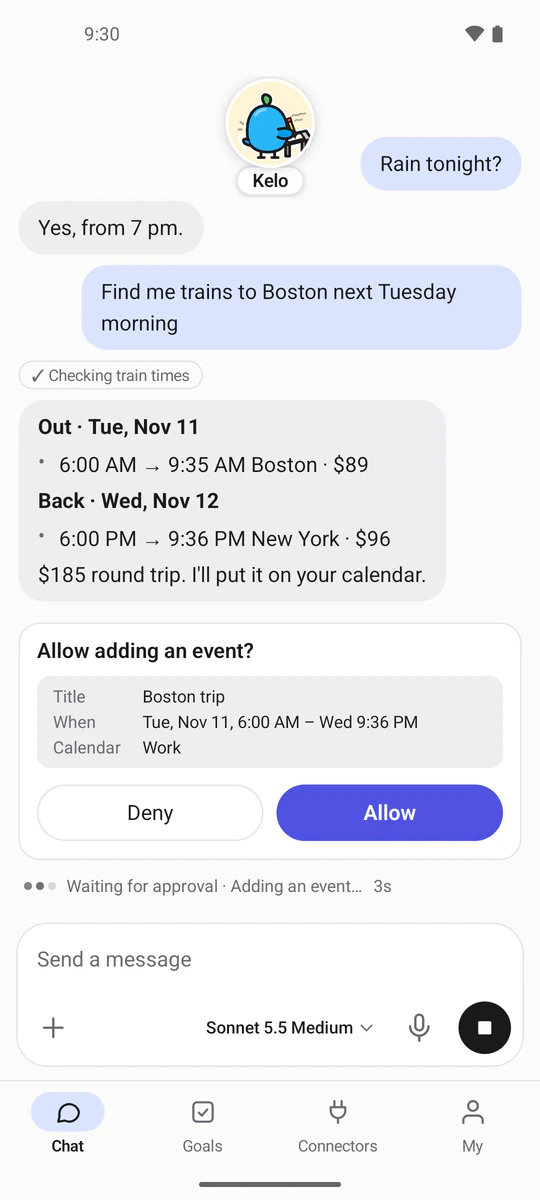
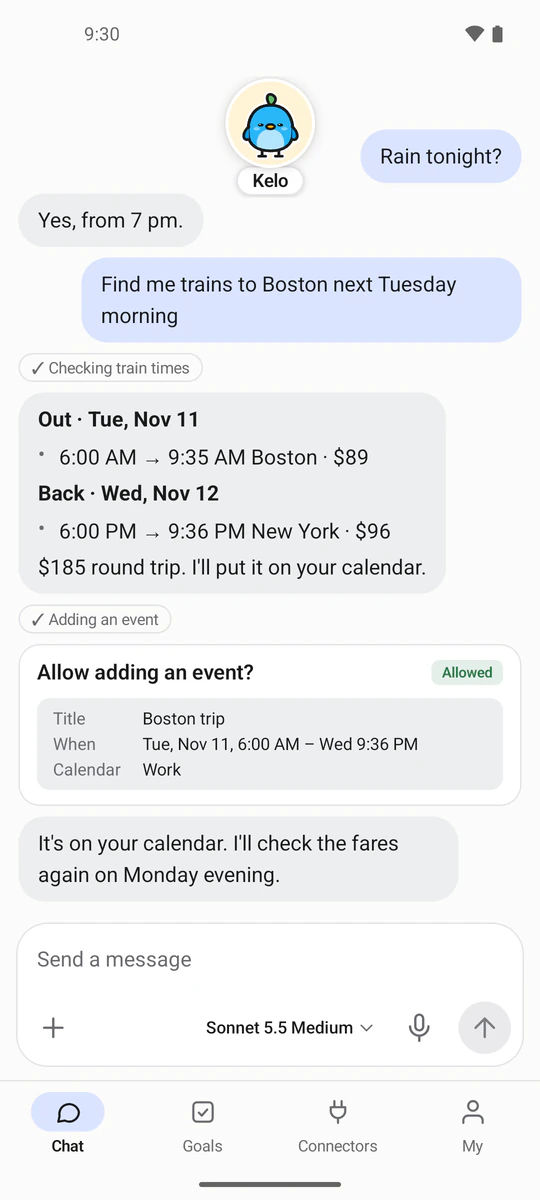
    Paying, ordering, booking, sending, deleting: anything hard to undo sends an approval card to your phone first, saying in plain words what's about to happen. Nothing moves until you allow it.

    An approval card in the chat asks whether to add the Busan trip to the calendar, with Deny and Allow buttons.
  4. It looks back every night

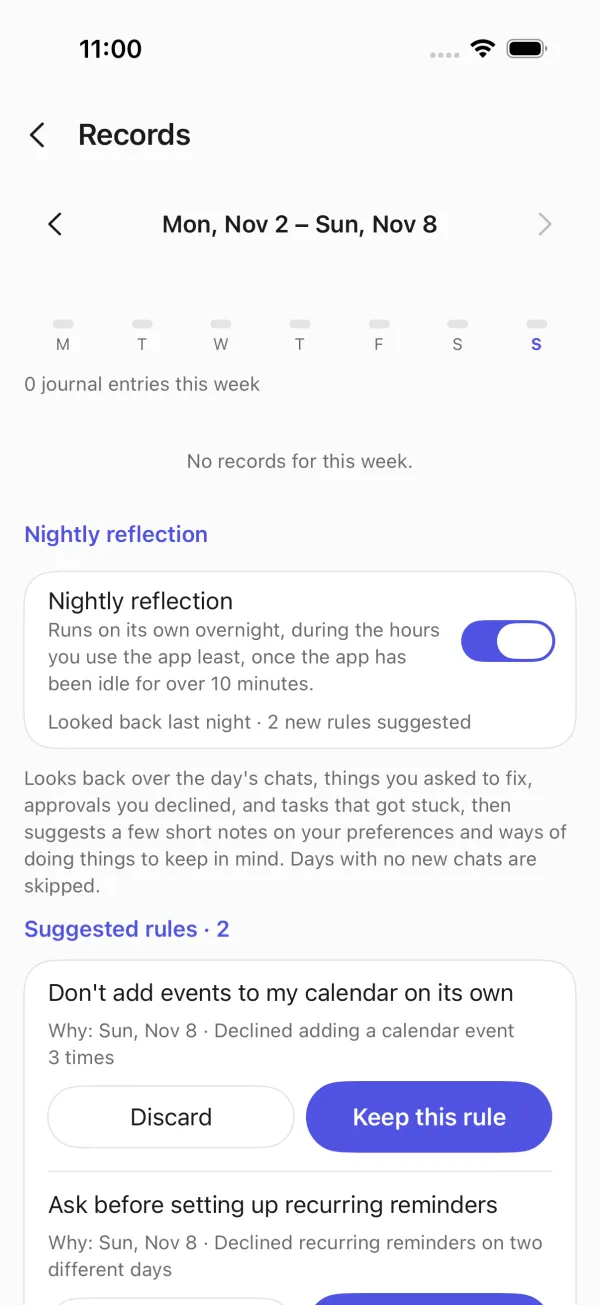
    At the end of the day it reads back over your conversations and suggests short rules about how you like things done. Keep or reject each one; a rejected rule is never suggested again.

    Records screen: the nightly look back is on, and two suggested rules wait to be kept or rejected.
Kelo chat: KTX times and fares for a Busan business trip next Tuesday, laid out in a reply.
Work screen: the running task “Compare stays in Busan”, a price being watched, and upcoming schedules.
An approval card in the chat asks whether to add the Busan trip to the calendar, with Deny and Allow buttons.
Records screen: the nightly look back is on, and two suggested rules wait to be kept or rejected.

What it does

From one chat line to files and reminders

Kelo starts with a conversation, makes the files, keeps track of the schedule and speaks up when something needs you.

Work room

Spreadsheets and documents come out of the work room

A sealed-off space with no internet and no secrets, where Kelo runs code. It builds spreadsheets, Word and PowerPoint files and charts, and converts PDFs, images, audio and video from one format to another. Results land in your library, and every package install asks you first.

  • Spreadsheets
  • Word
  • PowerPoint
  • Charts
  • PDF
  • Images
  • Audio
  • Video
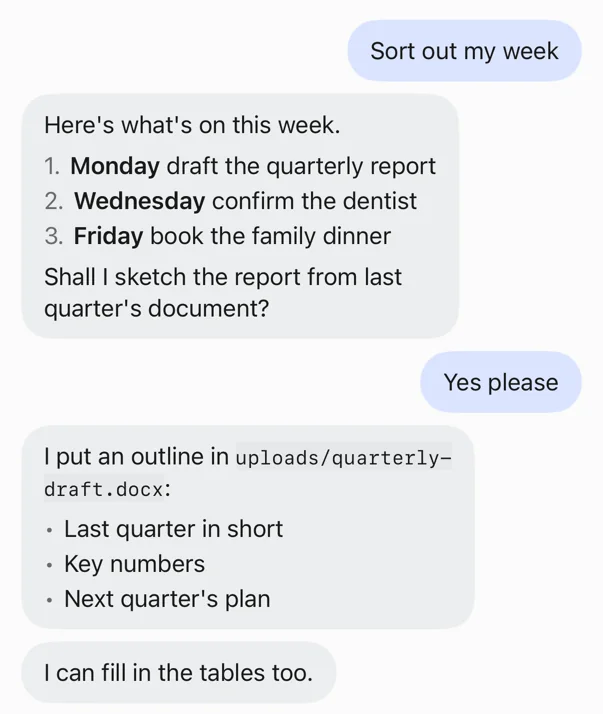
Kelo chat: the week sorted out, and an outline of the quarterly report saved as a Word file.

News alerts

Follows up while you're away

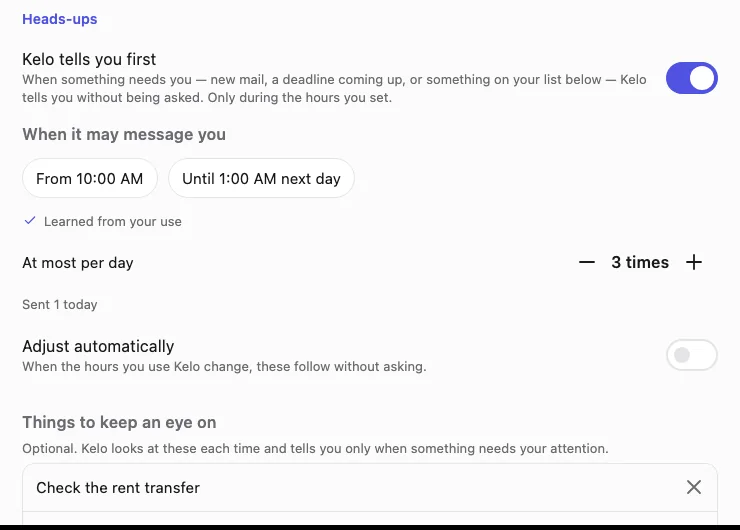
When something needs you, Kelo tells you without being asked. It learns the hours you use it and keeps quiet outside them.

  • An important email arrives
  • A scheduled job has its result
  • A price or page you're watching changes
  • A goal's deadline is coming up
Notification settings: “Kelo tells you first” is on, and the hours it may message you, 10:00 AM to 1:00 AM, were learned from your use.
  1. Schedules · watchers

    On its own, when you said

    Say “around 9 every morning” or “every 30 minutes” and it runs then. It wakes only when a page shows certain words or a price drops below your number, and those checks don't use an AI model.

    An old alarm clock on a wooden bookshelf.
  2. Keychain

    Passwords never go through the chat

    Passwords and API keys go in through a form in the app and stay locked on your Kelo server. Nobody can read what you store, and the assistant uses the values without seeing them.

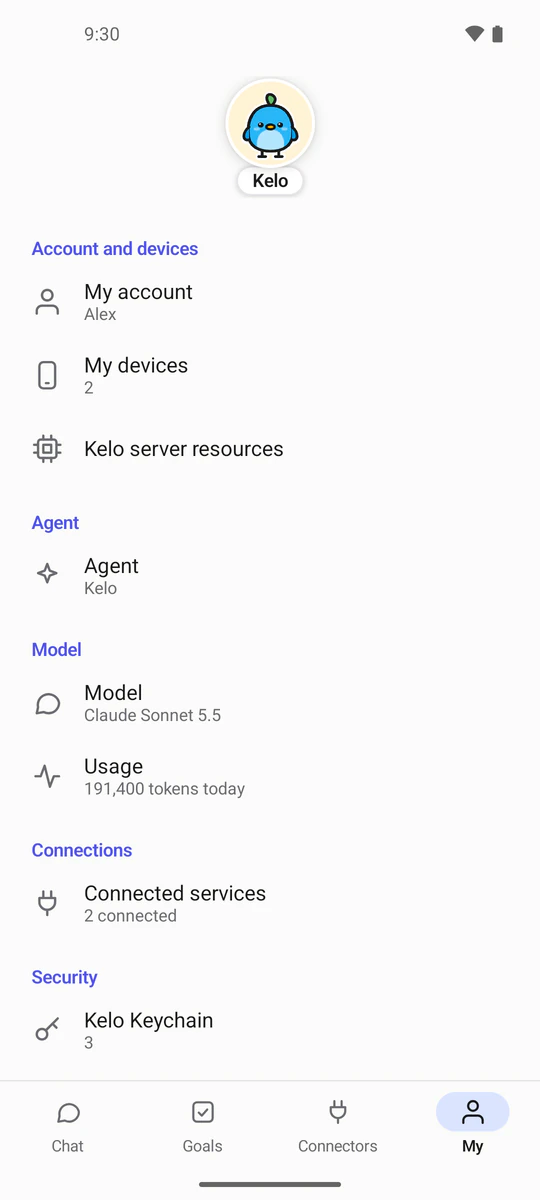
    My screen: account and devices, model, usage, connected services and the Keychain.
  3. Payment cards

    It pays only when you allow it

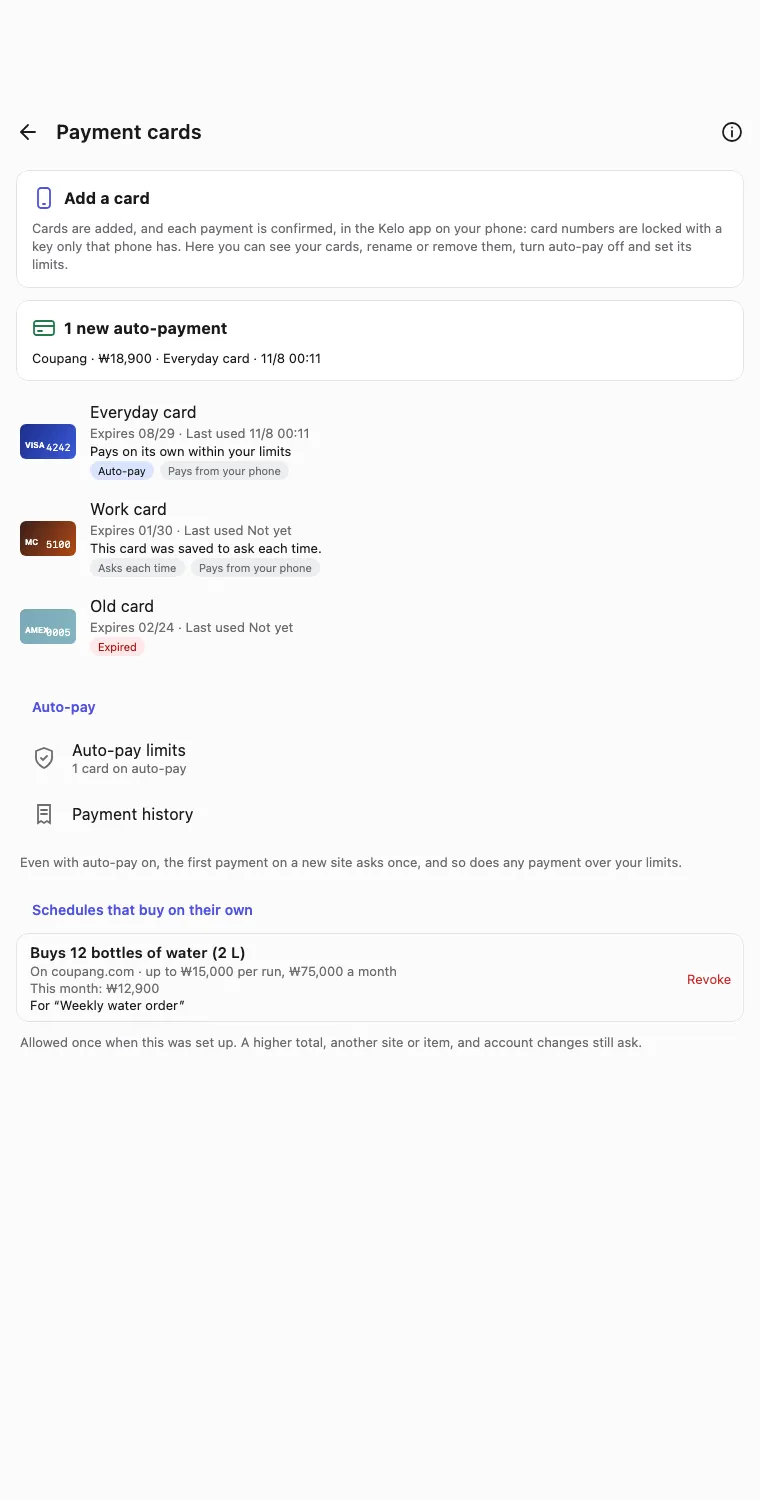
    Choose per card whether it may pay on its own. Cards without auto-pay are locked with a key only your phone holds, so even your server can't read them, and each payment needs your fingerprint or face.

    Payment cards screen: three cards, whether each may pay on its own, and the auto-pay limits.
  4. Goals

    Goals become plans

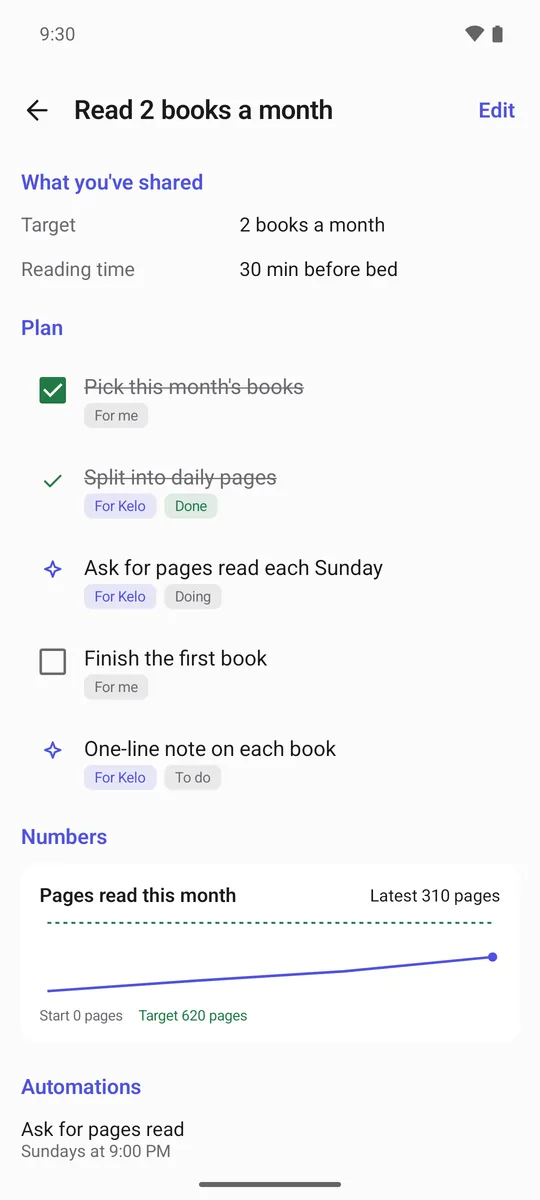
    Write down a goal and Kelo splits it into what you do and what it does, and keeps track of the numbers and the deadline.

    Goal “Read 2 books a month”: a plan split between you and Kelo, and 310 pages read this month.
  5. AI models

    The model you want, local ones too

    Pick from about 30 AI companies, or connect a local model through LM Studio, Ollama and the like. You pay the company you chose directly, with your own API key.

  6. Languages

    In 20 languages

    The app and the server's messages come in 20 languages, English and Korean among them, and Kelo answers in the language you wrote in.

  7. Self-hosted apps

    Works with the apps you run at home

    Connect Home Assistant, Frigate, Immich, Paperless-ngx, Mealie, Tandoor, Grocy, Actual Budget, Firefly III, Linkwarden, Karakeep, Wallabag, Miniflux, FreshRSS, n8n, Uptime Kuma, Beszel, AdGuard Home, Pi-hole, Nextcloud, Gitea, Forgejo by their address on your network or Tailscale. Kelo asks them directly and nothing leaves your network. Things you ask for in your own message, like unlocking the door, happen at once. Addresses that point back at Kelo itself or at a cloud metadata service are refused. Coming later: https with a self-signed certificate.

Connectors

Works with the services you already use

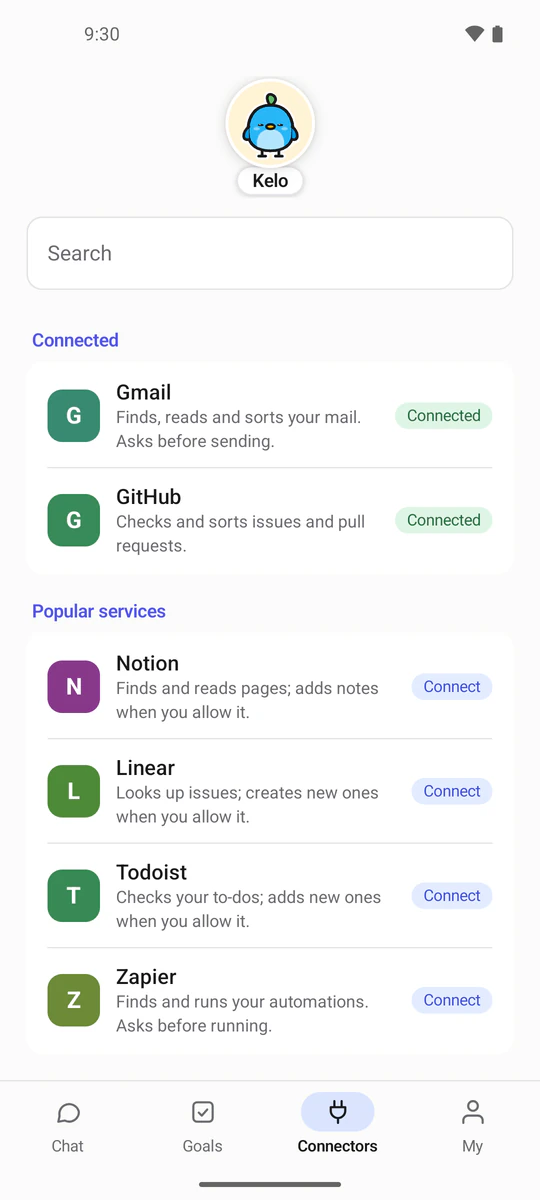
Notion, Linear, Todoist, Zapier and GitHub connect through each one's own sign-in page. Gmail and Naver, Daum or iCloud mail connect with an app password.

  • Gmail
  • GitHub
  • Notion
  • Linear
  • Todoist
  • Zapier

On your phone you can turn on the calendar, contacts, opening the dialer, and Health Connect (only in the app downloaded from kelo.chat).

Connectors screen: Gmail and GitHub are connected; Notion, Linear, Todoist and Zapier are ready to connect.

Many phones, many people

One server per person, any number of phones

A Kelo server is one person's assistant. To share Kelo, give each person a server of their own.

One machine running Kelo
  • One server per person

    Chats, memory, keys and cards are kept fully apart. Nobody sees anyone else's conversations.

  • Any number of phones

    Pair as many phones and desktop apps with one server as you like. One QR scan each.

  • Several copies on one machine

    The machine that runs your server can run several copies of Kelo. Each copy has its own address and its own data.

  • Resources in numbers

    Set the RAM, CPU and disk each copy may use, or let it use what the machine has.

Reaching your server

Three ways to reach your server from outside

Pick one and your phone reaches the Kelo server away from home. You can switch any time.

Kelo address (offered for now)TailscaleA domain you own
SetupOne command. No router changes.The Tailscale app on each phone, same account.A domain you own. A free one like DuckDNS works too.
Passes throughA Cloudflare Tunnel, over https.Nothing public at all.Nothing, if you connect directly. Your own proxy or Cloudflare also work.
Best whenYou want the easiest startOnly you should reach itYou already run a domain or a proxy

Privacy

Your data stays on your server

Your chats, notes, saved keys and cards are stored only on the Kelo server you run. kelo.chat does not store them, and the developer has no way into that server. Kelo ignores commands hidden in web pages or mail.

kelo.chat helps with only a few things

Kelo address
Traffic uses https through a Cloudflare Tunnel to your server. If you'd rather avoid that, use Tailscale or your own domain.
Notifications
Push notifications carry only a signal that something new happened. The app fetches the content from your server.
Google and GitHub sign-in
It brokers the sign-in and the token exchange and hands the token to your server. Tokens are never stored.

Your messages are sent to the AI provider you choose (for example Anthropic or Google) to get a reply. The source is public, so anyone can check all of this.

Install

Install the Kelo server with Docker

  1. Install the serverA few commands start Kelo. Pick the AI model in the app and connect it with your own key.
  2. Scan to pairScan the QR code the server shows with the Kelo app. Pair as many phones as you like.
  3. Talk from anywhereReach it from outside with a Kelo address (offered for now), Tailscale, or a domain you own.
curl -fsSL https://kelo.chat/install.sh | bash
irm https://kelo.chat/install.ps1 | iex

It checks Docker, gets uv if missing, downloads Kelo into ~/kelo and opens the guided setup. To do it by hand: the install guide.

Server size

  • Minimum2 GB RAM · 2 CPU cores · 10 GB free disk
  • Recommended4 GB RAM · 4 CPU cores · 20 GB free disk

Any Mac, Linux or Windows machine that runs Docker: a mini PC, a NAS or a cloud server.

Read the full install guide

Host Kelo on a free cloud server

Get the app

Get the Kelo app, then one QR scan

Free apps for iPhone, Android, Windows and macOS. Install one, then connect it to your Kelo server with the QR code or link from the install guide. The iPhone app is on the App Store and the Windows app is also on the Microsoft Store. The Android app is in beta testing: sign up as a tester. Google Play comes after the beta.

A hand holding a phone next to a takeaway coffee.
Get it from MicrosoftDownload on the App StoreAndroid beta testing – sign up

Phone

Android

Android beta testing – sign up

Or download the APK file directly

Download for Android (.apk)

Version 0.10.2 · 31.7 MB

Google Play comes after the beta.

Unlike the Google Play app, this one reads Health Connect records (steps, sleep and more) and can update to a new version from inside the app. Open the downloaded APK file. If Android asks, allow installing apps from this source (your browser or file manager), then tap Install. Android 8.0 or later.

Phone

iPhone

Download on the App Store

Needs iOS 17 or later. Opens the App Store on your iPhone.

Desktop

Windows

Get it from Microsoft

Or download the installer directly

Download for Windows (.exe)

Version 1.0.12 · 85.9 MB

MSI installer

Version 1.0.12 · 85.3 MB

The Microsoft Store version has no such warning. The installer files above aren't code-signed yet, so Windows SmartScreen may stop them: choose More info → Run anyway. Windows 10 or 11.

Desktop

macOS

Download for macOS (.dmg)

Version 1.0.12 · 94.5 MB

Drag Kelo to Applications. It is signed and notarized by Apple, so it opens right away. For Macs with Apple silicon (M1 or later).

Each build's version, size and SHA-256 are listed at /download/latest.json.

FAQ

Questions people ask

More in the install guide.

What kind of machine do I need?

A Mac, Linux or Windows machine that runs Docker. The minimum is 2 GB RAM · 2 CPU cores · 10 GB free disk; 4 GB RAM · 4 CPU cores · 20 GB free disk is recommended.

How do I pay for the AI model?

You pay the AI company you chose directly, with your own API key. Kelo doesn't sit in the middle. A local model costs nothing extra.

What happens when the server's machine is off?

The assistant rests too. When it's back, a scheduled run missed within the last two hours runs once; older ones wait for their next time.

I got a link to connect my phone, and this page opened.

Open the Kelo app, then scan the QR code on the connect screen or paste the link into ‘Paste link’ as it is. The link works once, for 10 minutes.

Do my chats go to the people who make Kelo?

No. Your conversation travels only between your Kelo server and the AI company that writes the replies. Only a reply you send yourself with “Report this reply” reaches the developer.

Can web pages or mails make the assistant do things I didn't ask for?

No. Kelo treats what it reads on web pages, in mail and in files as information only, and does not follow commands hidden in it. When text tries to move your data or money, Kelo ignores it and sends you a notice. Sending, changing or deleting anything waits for your approval.

Can my family use it too?

Yes. Run one copy of Kelo per person on the same machine, and chats and keys stay fully apart.

Does it work on iPhone?

Yes. The iPhone app is on the App Store (iOS 17 or later). Android is in beta testing, and there are Windows and macOS apps too.

Which languages does it speak?

The app and the server's messages come in 20 languages, English and Korean among them.

Start your own AI assistant

Free and open source under AGPL-3.0. Any machine that runs Docker will do.